
Sole-tenant nodes are an important service on Google Cloud Platform to run workloads that require workload isolation or need to comply to specific licensing requirements that demand dedicated infrastructure. A detailed description what a Sole-Tenant Node is and how it is different from general fleet VMs can be found in the Compute Engine documentation.
Sole-tenant nodes supports different maintenance policies which can be selected based on the workload requirements. A maintenance event happens when Google needs to update the underlying infrastructure.
This article focuses on the Migrate within node group maintenance policy which is primarily used for scenarios where a fixed-sized group of nodes is required (e.g. licensing constraints). The sole-tenant node documentation has more information about the possible maintenance policies and their use-cases.
Challenge#
As sole-tenant nodes are a good fit for long running workloads due to shifts in resource requirements like the demand for new VMs or other VMs being decommissioned, over time the resource distribution within a node group may not be perfect. While the Compute Engine scheduler aims to achieve the highest possible bin-packing ratio depending on outside factors this might not always be possible.
In rare cases this may lead to situations, where more sole-tenant nodes are deployed than strictly necessary.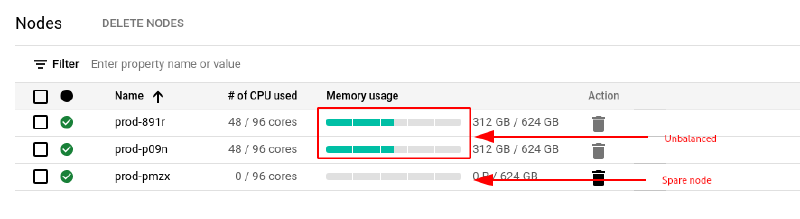
While it is possible for node groups that do not have the Migrate within node group maintenance policy set to manually live migrate VMs to other nodes in order to increase density, this is not possible for node groups that use Migrate within node group policy. This is due to the fact that manual live migration uses affinity labels to target individual nodes which can’t be used in conjunction with this policy.
Workaround#
When a VM is either shutdown and restarted or even only suspended and resumed, the scheduler will make new decisions for placement and aim to maximize bin-packing.
While both of these actions come with downtime, suspend and resume will retain the VMs state and unavailability will be in the span of seconds.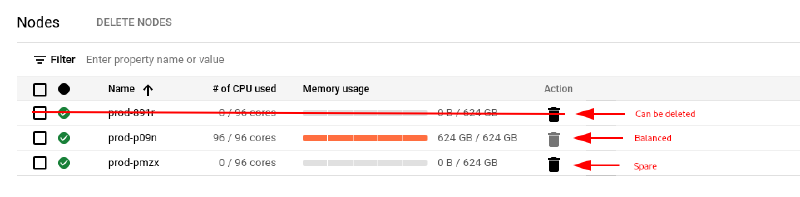
Proof of concept#
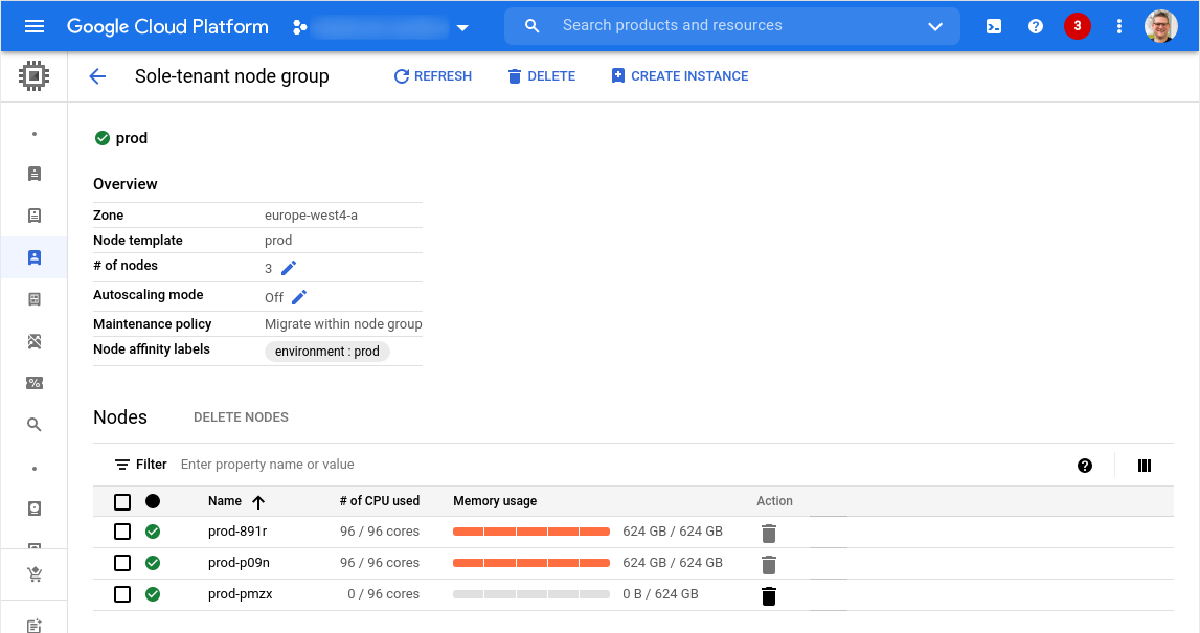
The following script creates a sole-tenant node group with Migrate within node-group maintenance policy. It creates three nodes (two for running VMs and one to satisfy the maintenance policy requirements).
# Create node template
gcloud compute sole-tenancy node-templates create prod --node-type=n1-node-96-624

# Create node group
gcloud compute sole-tenancy node-groups create prod --node-template=prod --target-size=3 --maintenance-policy=migrate-within-node-groupThe nodes running VMs are subsequently filled with VMs after which artificial gaps are created on both sole-tenant nodes.
# Create smaller VMs
for number in 01 02 03 04 05 06 07 08 09 10 11 12; do
    gcloud compute instances create small-vm-$number --machine-type=n1-highmem-16 --node-affinity-file affinity.json --enable-display-device --image=debian-11-bullseye-v20210817 --image-project=debian-cloud --boot-disk-size=10GB --boot-disk-type=pd-balanced --boot-disk-device-name=small-vm-$number --shielded-secure-boot --shielded-vtpm --shielded-integrity-monitoring
done

# Create some holes by deleting some VMs
for number in 01 02 03 10 11 12; do
    gcloud compute instances delete small-vm-$number --quiet
doneFinally the VMs on the second node are paused and then resumed causing the Compute Engine scheduler to resume the VMs on the first node to maximize resource utilization.
# Pause VMs
for number in 07 08 09; do
    gcloud beta compute instances suspend small-vm-$number
done

# Resume VMs
for number in 07 08 09; do
    gcloud beta compute instances resume small-vm-$number
done