Identity-Aware Proxy (IAP) is a powerful tool in the tool chain of Google Cloud administrators and users. It can be used to control access to cloud-based and on-premises applications and VMs running on Google Cloud.
IAP adds *common *authentication and authorization infrastructure based on Cloud IAM to connections without the need for a change to program or protocol logic. By removing the need to expose connection endpoints to the public internet, IAP works from all networks without the need for a VPN connection.
Using IAP (for RDP)#
IAP works by establishing a tunnel between the local machine and a managed endpoint in Google Cloud (no setup required, works out of the box). The tunnel is opened through gcloud:
gcloud compute start-iap-tunnel bastion 3389 --zone europe-west4-aThis will open the tunnel and will, by default, pick a dynamic free local port:
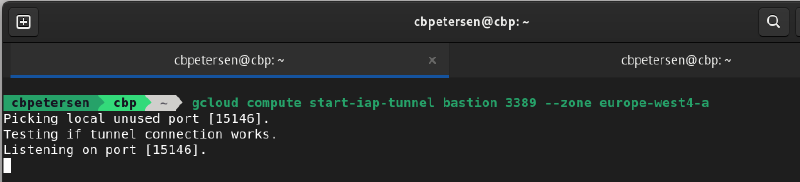
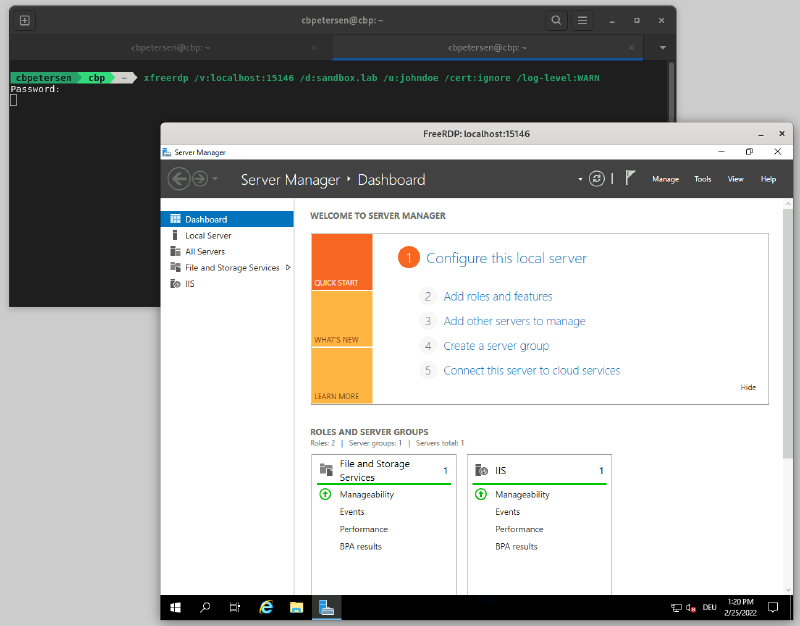
In order to now connect to the service that is now exposed locally, you then start the respective app to consume it. Staying with the scenario above you’d use a RDP client (I’ve found that freerdp works best for me) and connect to the local port
xfreerdp /v:localhost:15146 /d:sandbox.lab /u:johndoe /cert:ignore /log-level:WARNConnecting to RDP through IAP
Which establishes the RDP connection through IAP:
So what is the challenge?#
Whenever a service is exposed through IAP, the tunnel needs to be established first in order to be able to access the service. In a normal workflow this may only be a nuisance but for automation this is a non-starter.
Enter iap-chain.sh#
iap-chain.sh (available on GitHub) is a Bash script that chains IAP and an arbitrary local command together. The command is executed when the tunnel has been established. As the port is dynamically allocated a special variable can be used in the command syntax which is replaced before execution.
This enables all kinds of scenarios. While my primary work environment is Linux I work a lot with Windows systems and need to connect to RDP fairly often. Following the 2-step process to get to a VM is cumbersome at times so I have a helper function around iap-chain.sh and freerdp:
#!/usr/bin/env bash

rdp()
{
  POSITIONAL_ARGS=()

  instance=
  port=3389

  if [ "${ZONE-}" != "" ]; then
    zone=$ZONE
  fi

  if [ "${GOOGLE_CLOUD_PROJECT-}" != "" ]; then
    project=$GOOGLE_CLOUD_PROJECT
  fi

  disable_connection_check=
  extra=

  while [[ $# -gt 0 ]]; do
    case $1 in
      -p|--project)
        project="$2"
        shift
        shift
      ;;
      -z|--zone)
        zone="$2"
        shift
        shift
      ;;
      -d|--disable-connection-check)
        disable_connection_check="--disable-connection-check"
        shift
      ;;
      --)
        shift;
        break
      ;;
      -*|--*)
        echo "Unknown option $1"
        return 1
      ;;
      *)
        POSITIONAL_ARGS+=("$1")
        shift
      ;;
    esac
  done

  instance=${POSITIONAL_ARGS[0]}
  extra="$@"

  iap-chain.sh $instance $port --project $project --zone $zone $disable_connection_check -- xfreerdp +clipboard +home-drive /kbd:0x00000407 /kbd-lang:0x0407 /dynamic-resolution /scale:180 /scale-desktop:140 /log-level:WARN /v:%SERVER% $extra
}
Exposed through .bash_profile this makes the example from above really easy:
rdp bastion -- /d:sandbox.lab /u:johndoe /cert:ignoreEt Voilà, IAP tunnel established and chained command executed:
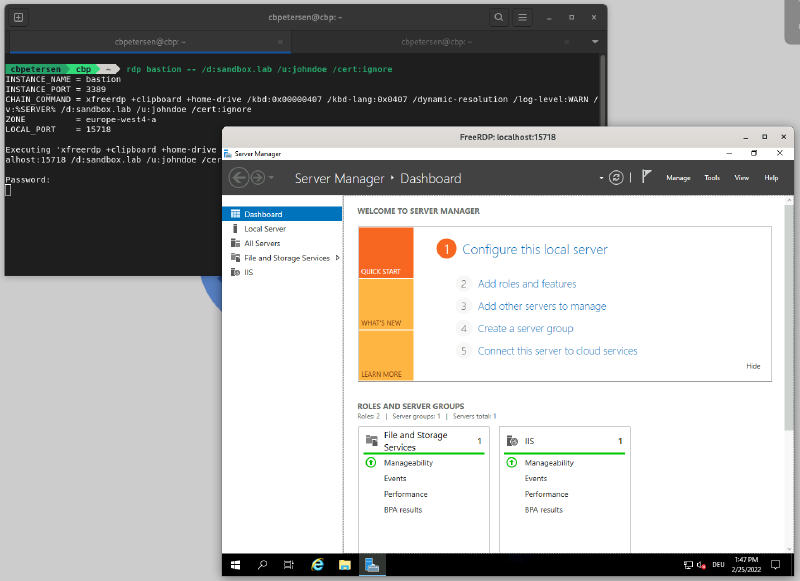
Alternative considerations#
iap-chain.sh aims to generically applicable to many use cases. In this section I present some use-cases for which purpose built tools are available.
SSH through IAP#
For SSH’ing into a VM running on Google Cloud there is a neat shortcut:
gcloud compute ssh my-linux-box --tunnel-through-iapNot only will this establish the IAP tunnel and subsequently start SSH but also automatically manages the key according to your GCE project settings.
RDP/SSH through IAP on Windows#
For Windows Johannes Passing has written IAP Desktop. Among others it provides RDP and SSH through IAP, connection management, project browsing for VMs. In short the swiss army knife for remote management on Windows.