
Azure File Sync network bandwidth calculator
  1. Posts/

Azure File Sync network bandwidth calculator

·180 words·1 min
Christoph Petersen
Author
Christoph Petersen

When deploying Azure File Sync one question many customers routinely ask is how the network bandwidth required can be calculated. This depends of course on a variety of factors.

The most prominent factor is churn rate. How much data is changed over time. It is best to look at this rate with an hourly resolution so that seasonality can be accounted for (user-centric shares will have much more churn throughout working hours).

One other question that needs to be answered is sync time: would it be okay if data is not directly synced as the line is saturated or does data needs to be synced immediately? This question is also important when defining throttling limits.

With these parameters at hand you can build a simple calculator that spits out the required bandwidth to transfer data directly.

Event better: I have built that calculator for you. As most customers do not have churn data based on hourly measurements the calculator takes a parameter for the distribution of data for the working hours pre-set to ~66.6%.
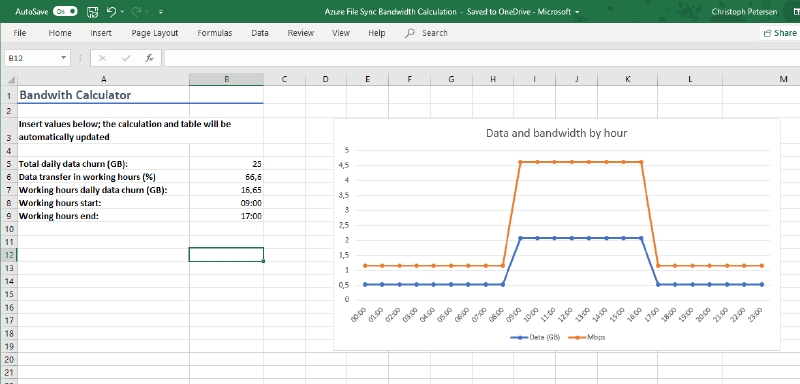
Screenshot of Azure FIle Sync bandwidth calculator

Download Azure File Sync bandwidth calculator.xlsx.

Related

Azure File Sync in proxied environments

·235 words·2 mins
Azure File Sync lets you tier data from on-premises systems to a cloud share based on Azure File. Local nodes can act as hot-caches, caching data based on access and modification patterns. Azure File Sync supports multi-master sync so that you can deploy those caches to multiple offices and replicate data across your organization.

Install Azure PowerShell Cmdlets through proxy

·232 words·2 mins
Photo by rawpixel on Unsplash When setting up Azure File Sync one of the requirements is to have the Azure PowerShell Cmdlets (AzureRM) installed. Many customers have proxies deployed which control internet egress. Many of these also use authentication to secure internet access.

Tracking changes to Azure Resource Manager providers

·65 words·1 min
A colleague of mine, Tyler Ayers, has written a pretty neat Azure Function that tracks changes made to Azure Resource Manager Providers (ARM) and show these changes in a timeline.